|
<< Click to Display Table of Contents >> All Rentals |
  
|
|
<< Click to Display Table of Contents >> All Rentals |
|
All rentals screen shows all scheduled rentals in the system. This is a great place to create reports and get an exact amount of how much you will be receiving in rentals.
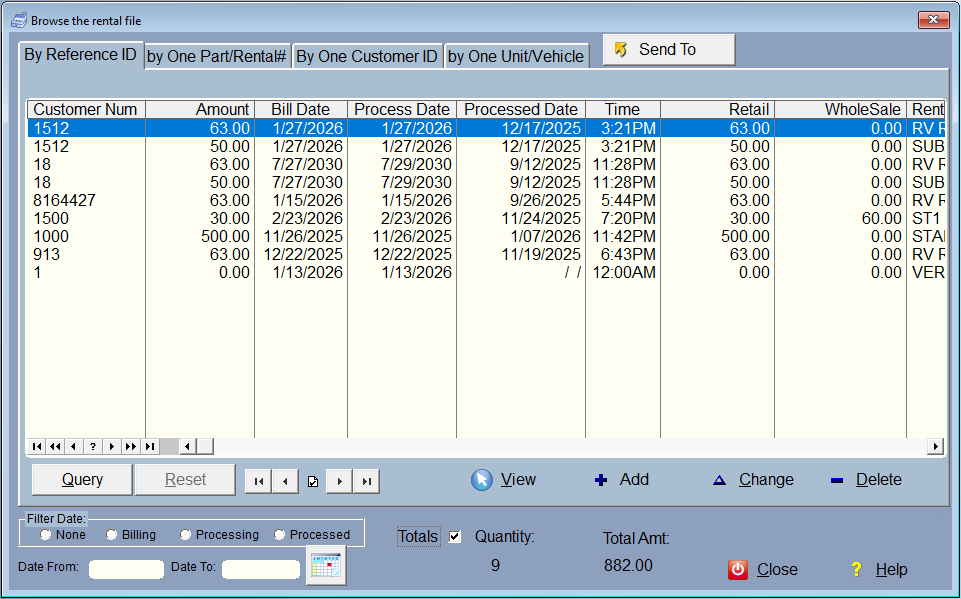
All Rentals Screen
Rentals that have yet to be processed are in this screen. By simply checking the Totals Check at the bottom, you get the total amount of rentals that are scheduled to be processed.
There are a number of filters on this screen, including date range filters by billing, processing, or processed date. You can also search for rentals by customer or vehicle (if you're storing vehicles).
With the Query function, there is no real limit on how you filter the rentals on this screen.
There is a SendTo button to send the list that you see, to a report, or a file like a spreadsheet.