* * HELP & MANUAL PREMIUM PACK 3 DEMO VERSION * *
This documentation was styled with a demo skin from the Premium Pack 3 add-on for Help & Manual. The contents of the skin are encrypted and not configurable.
This version is copyright and may only be used for local testing purposes. It may not be distributed.
Please purchase the full version of the Premium Pack to get the configurable skins and remove this notice.
Our Email system uses SMTP (Simple Mail Transfer Protocol). This allows you to connect to any email system you have that supports SMTP, and most do.
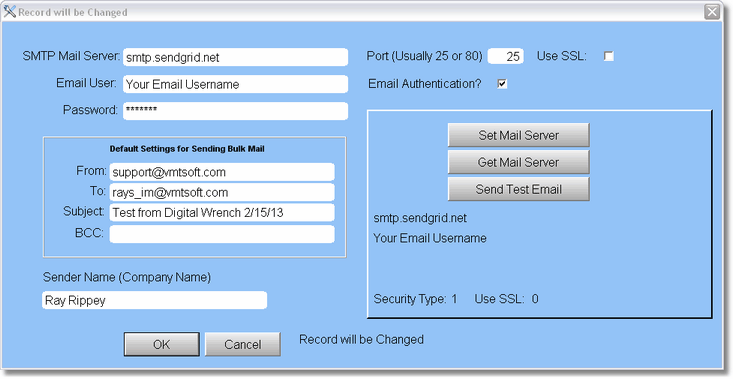
You can usually find out your SMTP setting from your Email provider. If you're using Email from a web email service like Google (Gmail) or Yahoo, you can look it up on the internet.
The settings you'll get from your Email provider are at the top. You'll need to know what port, and if they use SSL and/or Email Authentication.
The Default settings are where the Email comes from, and where it goes when you're sending bulk (many emails at once).
The best thing to do is try it out.
When you think you've got it setup, click on Set Mail Server first, then click on Send Test Email. If it's going to error out, it may take a few minutes to get the error back, so be patient, do not shut down the program. You will get a Successfully sent message pretty quick if it works, and you'll get an email in your inbox.
Here's the info from about.com concerning gmail smtp settings:
•Gmail SMTP server address: smtp.gmail.com
•Gmail SMTP user name: Your full Gmail address (e.g. example@gmail.com)
•Gmail SMTP password: Your Gmail password
•Gmail SMTP port: 465
•Gmail SMTP TLS/SSL required: yes
With Gmail, they are using a more secure setting in some cases, and at this point our email won't work with that setting on. To turn it off, sign in to your Gmail account and go to the Account settings. On that page you should see a Sign in and Security link.
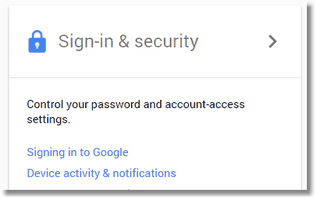
From here, click the link for Sign-in & Security and scroll all the way down until you see Allow Less Secure Apps
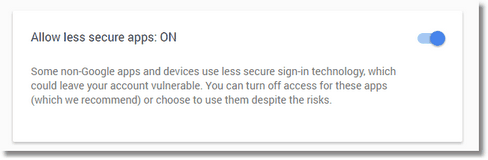
Turn it on. This should allow our Email to work with Gmail.
Here's the info from about.com concerning yahoo smtp settings:
•Yahoo! Mail SMTP server address: smtp.mail.yahoo.com
•Yahoo! Mail SMTP user name: Your full Yahoo! Mail email address (including "@yahoo.com")
•Yahoo! Mail SMTP password: Your Yahoo! Mail password
•Yahoo! Mail SMTP port: 465
•Yahoo! Mail SMTP TLS/SSL required: yes
Here's the info from about.com concerning hotmail smtp settings:
•Windows Live Hotmail SMTP server address: smtp.live.com
•Windows Live Hotmail SMTP user name: Your complete Windows Live Hotmail email address ("me@hotmail.com" or "me@live.com" for instance)
•Windows Live Hotmail SMTP password: Your Windows Live Hotmail password
•Windows Live Hotmail SMTP port: 587
•Windows Live Hotmail SMTP TLS/SSL required: yes
