|
<< Click to Display Table of Contents >> Add Package Name |
  
|
|
<< Click to Display Table of Contents >> Add Package Name |
|
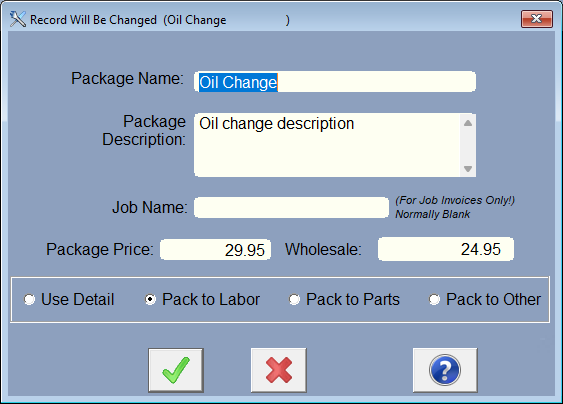
Enter the package name, like Oil Service.
If you charge one price for the package, not for each item in it, then enter the description of what is being done and the price for the whole package. To make the package price work for the RO, all the items in the package will be added to the RO (with zero pricing), plus another item with the package name in the labor, or Parts, or Other section, with the package price. Choose Pack to Labor, Parts, or Other to determine where the package will be charged and displayed in the invoice.
The package price can now be different depending on if the customer is a Retail or Wholesale customer.
If you charge separately for each item in the package, check mark the Use Detail Pricing.
Do not use the Job Name unless you actually want to create a Job that will then use the special Job Invoice. See Job Invoices.