* * HELP & MANUAL PREMIUM PACK 3 DEMO VERSION * *
This documentation was styled with a demo skin from the Premium Pack 3 add-on for Help & Manual. The contents of the skin are encrypted and not configurable.
This version is copyright and may only be used for local testing purposes. It may not be distributed.
Please purchase the full version of the Premium Pack to get the configurable skins and remove this notice.
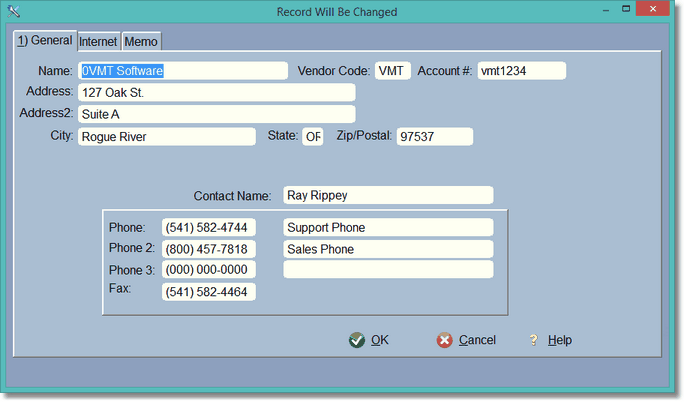
This is the entry form where vendors are added, changed, or deleted.
Each inventory part requires a vendor. It is also needed to create Purchase Orders.
The Vendor Name and the Vendor Code is REQUIRED, so something must be entered. You can make up your vendor code, or perhaps your vendor has a code. The Account number is your vendor account you will give to your vendor on your PO, Order, or when you call.
You can have 3 phone numbers, and a description to the right of each phone number.
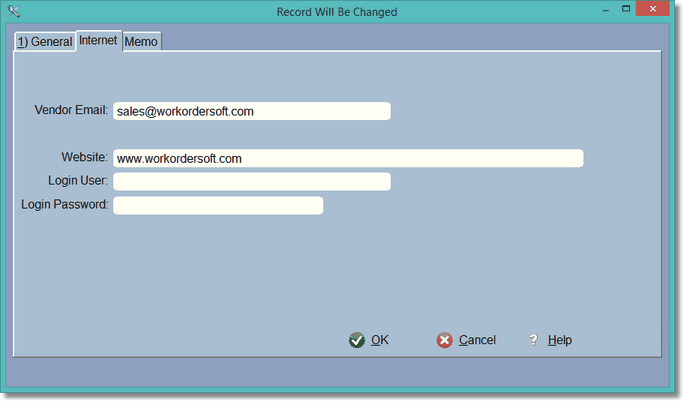
This is where you enter all of the internet information. If your vendor has a website and/or log-in information for ordering purposes, enter it here. The vendor Email is required if you are going to Email your Purchase Orders to the vendor.
